 SavvyCal Docs
Add buffer time between meetings
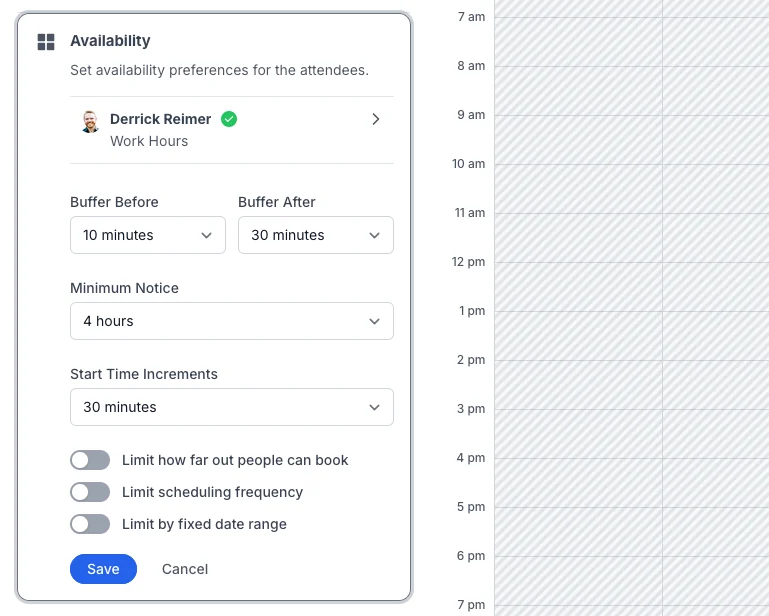
Open a scheduling link, click Availability, and set Buffer Before and Buffer After. Each can be from 0 minutes to 4 hours. SavvyCal then keeps that much time free around every busy event on the calendars it checks, not only meetings booked through SavvyCal.
Buffers are on every plan that includes scheduling links, starting with Basic.
How do I add buffers to one link?
- Open the scheduling link and click Availability.
- Choose a Buffer Before: the time to keep free before a new meeting.
- Choose a Buffer After: the time to keep free after a new meeting.
- Click Save.
Each one can be 0, 5, 10, 15, 30, or 45 minutes, or 1, 2, 3, or 4 hours.
Suppose you want 10 minutes of free time before a call to prepare, and 30 minutes after it in case it runs over. Set Buffer Before to 10 minutes and Buffer After to 30 minutes:
How do I set buffers for every new link?
Go to Settings > Links and find the Buffers section. Set Before Events and After Events. New links start with these buffers.
Changing them doesn't change your existing links. When some links have different buffers, a note under the section says how many, and Review lets you sync them. See Default settings for new links.
Do buffers apply around events I didn't book through SavvyCal?
Yes. Buffers apply around every event that blocks your time on the calendars SavvyCal checks, whether or not it was booked through SavvyCal. See How SavvyCal decides when you're busy.
Why do my buffers look backward around other events?
Buffers belong to the meeting someone might book, not to the events already on your calendar. That makes them look backward around those events.
Suppose your link has a 10-minute Buffer Before and a 30-minute Buffer After, and you have an event called "Busy Event" from 2 PM to 3 PM. SavvyCal blocks 30 minutes before it and 10 minutes after it:
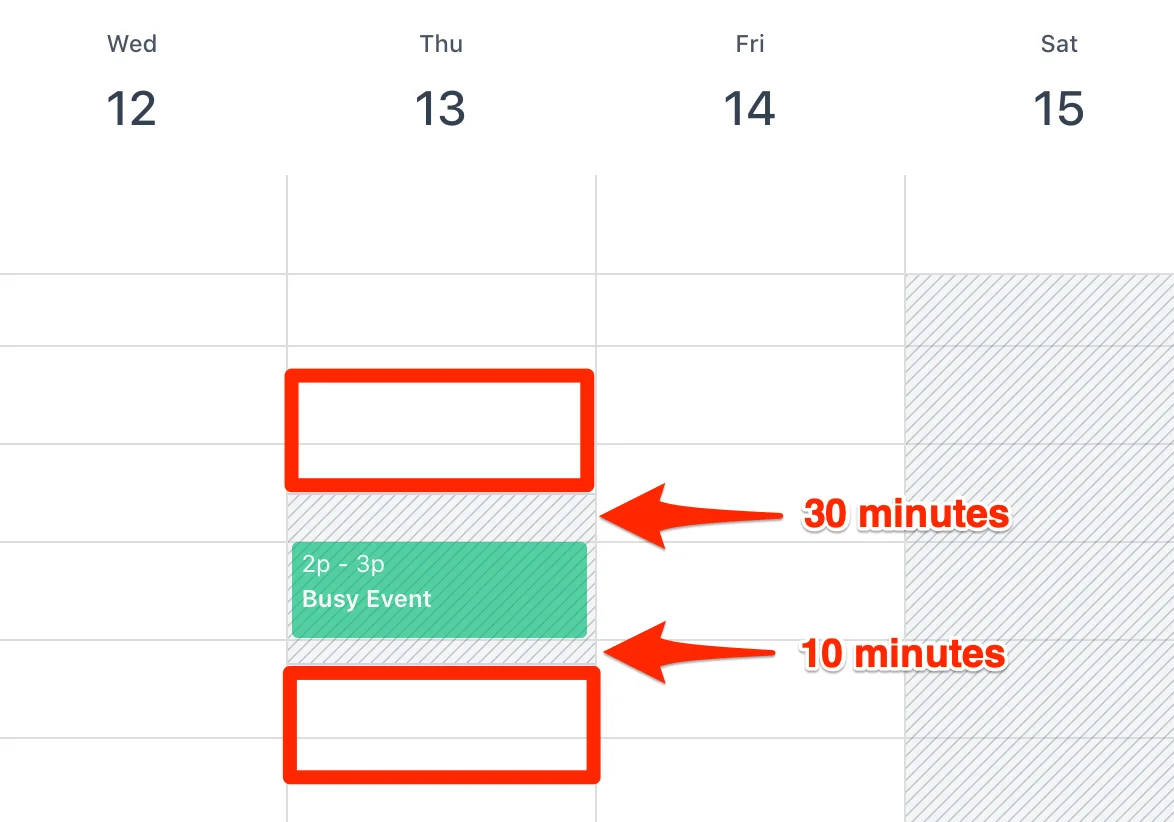
A meeting booked just before "Busy Event" needs 30 minutes free after it, so it has to end by 1:30 PM. A meeting booked just after needs 10 minutes free before it, so it can start at 3:10 PM.
What about meetings booked through SavvyCal?
Those meetings have buffers of their own, so SavvyCal uses whichever gap is bigger. Before the meeting, it keeps free the larger of the meeting's own Buffer Before and your link's Buffer After. After the meeting, it keeps free the larger of the meeting's own Buffer After and your link's Buffer Before.
What happens to meetings already booked when I change buffers?
Each booked meeting keeps the buffers its link had when it was booked. Changing a link's buffers doesn't change meetings that are already booked.
When you save new buffers and some upcoming meetings on the link have different ones, SavvyCal asks Sync event buffers? so you can update them too. To change the buffers on one booked meeting, see Can I change the buffers on a booked event?
Do buffers work on team and round robin links?
Yes. A team link has one Buffer Before and one Buffer After. When SavvyCal works out when each person on the link is free, it applies those buffers around that person's own busy events.
Learn more
- Prevent last-minute bookings with minimum notice.
- Configuring link availability covers every rule on a link.
- All the ways to control when people can book you
Still have a question? Contact support.