 SavvyCal Docs
Prevent last-minute bookings
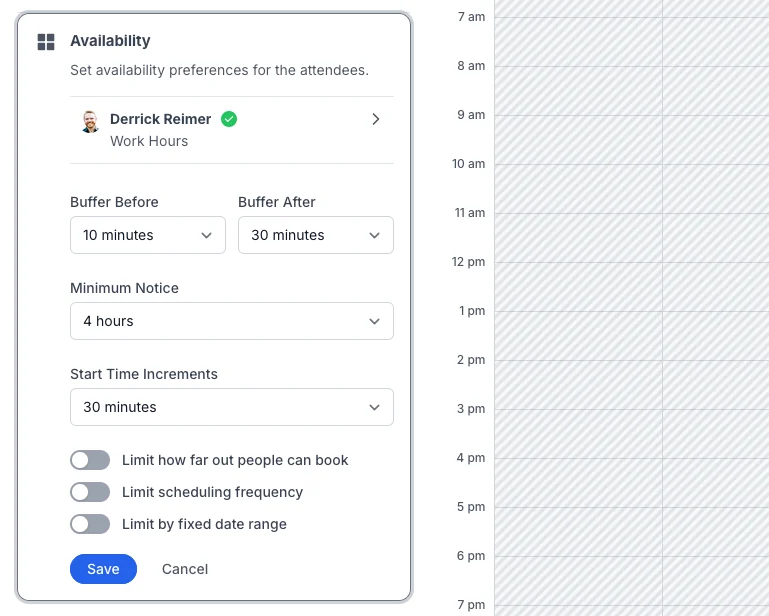
Set Minimum Notice on a scheduling link to require lead time before a meeting can start, from 0 minutes to 4 weeks. Open the link, click Availability, and choose the notice you need. With 24 hours, nobody can book a time in the next day.
Minimum notice is on every plan that includes scheduling links, starting with Basic.
How do I set minimum notice on a link?
- Open the scheduling link and click Availability.
- Choose a Minimum Notice.
- Click Save.
The choices run from 0 minutes up to 4 hours, then 8, 12, 24, and 48 hours, 3 days, and 1, 2, 3, or 4 weeks.
How is the notice counted?
From the moment someone views your link, around the clock. It doesn't count only your working hours. With 24 hours, someone looking at 3 PM on Tuesday can book 3 PM on Wednesday or later.
Because nights and weekends count, 24 hours' notice on a Friday afternoon still lets someone book Monday morning, if you're available then. To keep Monday morning free on a Friday, choose a longer notice, such as 3 days.
An Allow override can ignore minimum notice for the time it opens. See Customizing behavior for Allow overrides.
How do I set minimum notice for every new link?
Go to Settings > Links and find the Buffers section. Set Minimum Notice. New links start with it.
Changing it doesn't change your existing links. When some links have a different minimum notice or different buffers, a note under the section says how many, and Review lets you sync them. See Default settings for new links.
Can I stop people from rescheduling or canceling at the last minute?
Yes. Turn on Prevent last-minute changes in a link's Booking Page Options, and choose when the lock starts, from 15 minutes to a week before the meeting. You can still reschedule or cancel yourself. See Prevent last-minute changes to events.
Can I approve bookings before they're confirmed?
Yes. Turn on Require approval in a link's Booking Page Options, and each booking waits for you to approve or decline it. See Require approval for new events.
Can I stop people from booking too far ahead?
Yes. Turn on Limit how far out people can book in the link's Availability section and enter a number of days. See How do I limit how far out people can book?
Learn more
- Add buffer time between meetings
- Configuring link availability covers every rule on a link.
- All the ways to control when people can book you
Still have a question? Contact support.